
Stanley AI review (2026): pricing, features, and who it's for
Stanley is an AI "head of content" from the team behind Stan Store. You text it on iMessage, WhatsApp or Telegram, and it drafts, schedules and posts for you on X, Threads, LinkedIn and Instagram. Here is what it does, what it costs, and who should pick something else.
Updated October 2026 · Stanley's features and terms checked on its own site, and its prices read from its sign-up paywall, on October 28, 2026
What it is: an AI content assistant you message like a person. It learns your voice from your posts and voice notes, fills a content calendar, schedules and publishes, then reports back on how posts did.
What it costs: Stanley doesn't publish prices. Its sign-up paywall shows four plans (October 2026): Intern at $49 a month, Locked In at $199 a month, VIP at $1,000 a month, and Done For You from $3,000 a month. The iPhone app sells Stanley Pro at $44.99 a month.
Is it free? No. There is no free plan, only a free trial: 14 days on the web, 3 days in the iPhone app.
Who it suits: creators who want a coach that texts them, keeps them posting, and handles scheduling on X, Threads, LinkedIn and Instagram. It's a weaker fit if you need a free tier, write a newsletter on Substack, or already do your thinking inside Claude or ChatGPT.
What is Stanley AI?
Stanley is an AI assistant for creators, built by Find Community, Inc., the company behind Stan Store (the link-in-bio storefront many creators sell from). It describes itself as "your AI Head of Content across social media."
The idea is that Stanley acts less like a writing tool and more like a team member. It reaches out first with ideas, drafts posts in your voice, puts them on a calendar, publishes them at a good time on each platform, and tells you afterwards what worked. You talk to it the way you'd talk to an assistant: a voice note in, a draft back, "Tuesday at 6?", done.
Stanley started as coaching chat products for Instagram and LinkedIn creators, and the iPhone app is still written for Instagram ("Made for IG" is in its App Store description). Over 2026 it moved toward messaging: by October its homepage leads with "Message Stanley," which opens a text conversation, with Telegram and WhatsApp as alternatives.
How Stanley works
According to Stanley's terms of service (last updated October 22, 2026), you can use it in three places:
- By message: iMessage, SMS, WhatsApp or Telegram. This is the main experience. Drafts, reminders and results arrive as texts, and you approve with a reply.
- The web dashboard at getstanley.ai, where you manage connected accounts, billing and your calendar.
- The Stanley iPhone app, "Stanley: AI Head of Content," which keeps separate chat threads for different goals.
You connect your social accounts through each platform's own sign-in and authorization flow. The terms name X, LinkedIn, Instagram, Threads, TikTok and YouTube. Stanley publishes only at your direction, meaning when you publish a post or approve and schedule it. On TikTok you review each post's settings before it goes out.
The day-to-day loop on its homepage goes like this: Stanley texts you a few ideas in the morning, you send a voice note or pick one, it drafts in your voice for one or more platforms, you approve the draft and the time, it posts, and it texts you the link and the early numbers.
Stanley's main features
- Voice learning. Stanley says it learns how you talk from your past posts and your voice notes, so drafts read like you.
- Proactive ideas (Locked In and up). It scouts trends and messages you with ideas and draft concepts before you ask. On Intern, it drafts from the ideas you bring.
- Content calendar. It fills your week, picks posting times per platform, and moves posts when your plans change.
- Scheduling and publishing across the connected platforms, with nothing published until you approve it.
- Performance feedback. When a post does well, Stanley explains why and drafts the next ones from the same pattern.
- Creator coaching in the app: hooks, captions, scripts, story flows, and offers and DM scripts for selling, which ties back to Stan Store.
- Plans with people: VIP adds a human who tunes Stanley to sound like you and checks in weekly; Done For You has a professional writer create your posts.
Its homepage also shows Stanley replying to comments overnight and flagging brand deals in your DMs. Those are marketing mockups, so check in your own trial how much of that is live for your platforms.
Stanley AI pricing
Stanley has no pricing page, and its homepage shows no prices. On the web, the plans appear on a paywall right after you enter your email to sign up. This is what the paywall showed on October 28, 2026, using a test account. The iPhone app sells a separate subscription through Apple.
| Plan | Price | What you get |
|---|---|---|
| Intern | $49/month | Drafts posts in your voice from your own ideas, trends and outliers on demand, a morning brief and check-ins through the day, 3 custom workflows. |
| Locked In | $199/month | Marked "most popular." Adds Stanley scouting trends and checking in on his own, conversations worth joining, unlimited custom workflows and a weekly strategy review. |
| VIP | $1,000/month | Adds a human who sets Stanley up to sound like you, a strategy session, a weekly check-in with a person and a direct line to the team. Three-month minimum. |
| Done For You | From $3,000/month | A professional writer creates your posts on any platform, with a growth plan, a weekly writer check-in and a monthly report. Scoped to your platforms and goal; month to month. |
| Stanley Pro (iPhone app) | $44.99/month | The in-app subscription, billed through your Apple ID, with a 3-day free trial. |
Every plan starts with a 14-day free trial and then bills monthly (VIP has a three-month minimum); there is no free plan. Every plan includes scheduling on X, Threads, LinkedIn and Instagram, a content calendar and a knowledge base. When I first signed up in September, the trial asked for a card on file.
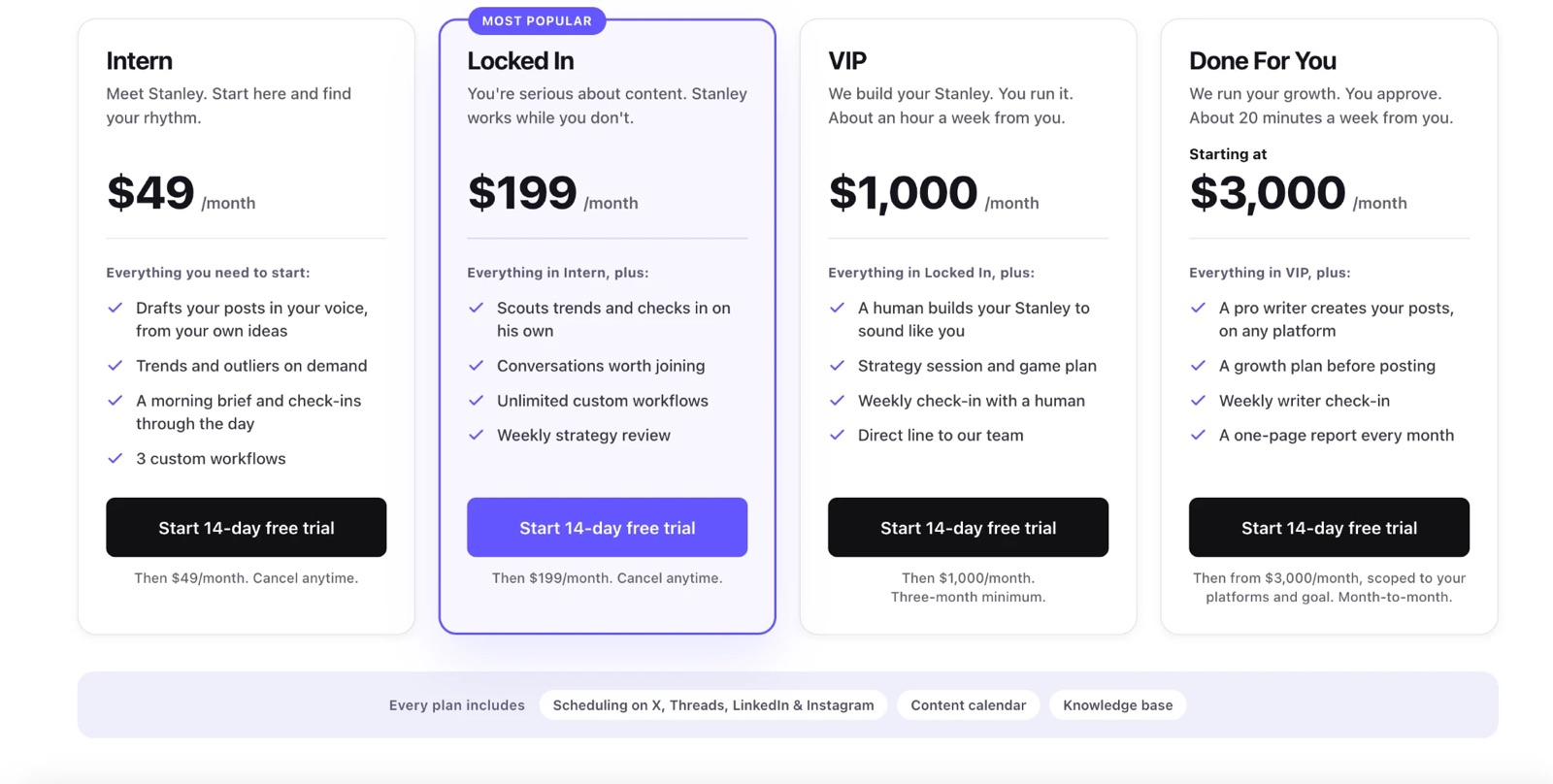
For most people the choice is $49 or $199. Intern drafts from ideas you bring it. The proactive Stanley the homepage leads with, scouting trends and checking in on his own, is listed under Locked In. VIP and Done For You add people: VIP has a human tune Stanley and check in weekly, and Done For You replaces the drafting with a professional writer.
The plans have moved before. In September the same paywall showed three tiers: Intern at $49 (usage-capped, for up to four months), Locked In at $199, and Done For You at $999.
You'll see other prices quoted around the web, usually $97 or $149 a month. Those come from third-party reviews, some describing earlier or separate Stanley products, and none of them match the paywall today. If you're budgeting, trust the paywall you see when you sign up, not a review (this one included).
Is Stanley AI free?
No. Stanley has a free trial but no free plan. On the web the trial is 14 days (it asked for a card when I signed up in September). In the iPhone app it's 3 days, then $44.99 a month through Apple.
To cancel on the web, Stanley's terms say you can do it from the Billing page in the dashboard or by messaging Stanley, and the plan runs to the end of the period you paid for. If you subscribed in the iPhone app, cancel through your Apple ID subscriptions instead, because Apple handles that billing.
What Stanley users say
The clearest public signal is the iPhone app. On October 28, 2026 it held a 4.6 average from 454 ratings in the US App Store. The written reviews are more mixed: of the 22 most recent written US reviews, 8 gave five stars and 13 gave one star.
The five-star reviews are about momentum. People describe posting every day for the first time, never running out of ideas, and feeling like they have a content team. One creator credits it with growing from 16k to over 100k followers.
The one-star reviews cluster around four complaints:
- Billing and trials. Several reviewers say they were charged after a trial they expected to be free, or couldn't find how to cancel.
- Support. A recurring complaint is emails and chats going unanswered.
- Memory. Some say Stanley forgets earlier conversations, repeats suggestions they asked it to drop, or gets worse with time instead of better.
- Glitches after updates, and Instagram connections that didn't work.
App Store reviews skew toward people with a problem, and these are about the app rather than the newer messaging experience. Still, billing and memory come up often enough to test during your trial: set a reminder before it ends, and check whether Stanley remembers what you told it in week one.
Stanley pros and cons
Pros
- Works over text, so there's no new app to remember to open.
- On Locked In and up, it nudges you with ideas and drafts before you ask.
- Schedules and publishes on X, Threads, LinkedIn and Instagram on every plan, through official sign-ins and only with your approval.
- Plans with real people (VIP and Done For You) if you outgrow the AI.
Cons
- No free plan, only a 14-day trial.
- Prices aren't public until you sign up.
- Proactive check-ins and trend scouting start at $199 a month.
- No Substack in its scheduling list.
- App reviews report billing, support and memory problems.
Who Stanley is for, and who should skip it
Stanley fits creators who post on Instagram, X, Threads or LinkedIn, want someone to keep them consistent, and like the idea of a coach that texts them. It also fits Stan Store sellers who want content tied to their offers, and people with the budget for a human team later.
Consider something else if:
- you want a free plan you can keep using, not a 14-day trial;
- you write a newsletter on Substack and want it in the same system as your posts;
- you're a founder or consultant writing mainly on LinkedIn, and want Stanley's proactive ideas without paying $199 a month for Locked In;
- you already work inside Claude or ChatGPT every day, and would rather your content assistant used what's already there than start a second relationship by text.
Stanley vs Liftli
Full disclosure: I build Liftli, so read this part as a competitor's view. The two share a lot. Both learn your voice, draft for you, schedule and publish only with your approval, and work from your phone. The difference is where they live.
Stanley is a separate assistant. You text it, and it learns about you from what you send it and the accounts you connect. Liftli runs inside the AI you already use (Claude, ChatGPT, Claude Code, Codex, Grok and Grok Bot today; Cursor, Hermes and OpenClaw in beta), so it works from what that AI already knows about your work, plus voice notes over Telegram. Liftli covers LinkedIn, X and Substack (Stanley schedules on X, Threads, LinkedIn and Instagram), and has a free tier with no card: 3 posts (edit each one as much as you like), 10 comments, and voice extraction from your existing writing. Paid plans are $29 a month for LinkedIn or $79 for LinkedIn, X and Substack.
If you're weighing a switch, the Stanley alternative comparison goes through it side by side, including when Stanley is the better choice.
How I reviewed Stanley
Everything here comes from Stanley's own surfaces: its homepage and terms of service (checked October 28, 2026), its sign-up paywall (September 7 and October 28, 2026, using a test account), and its App Store listing and reviews (October 28, 2026). Where I quote users, they're public App Store reviews. I haven't used Stanley's paid plans day to day, so I don't rate its draft quality here; the trial is the honest way to judge that for your own voice. If anything on this page is out of date, email support@liftli.ai and I'll correct it.